 Example
 Claude Code
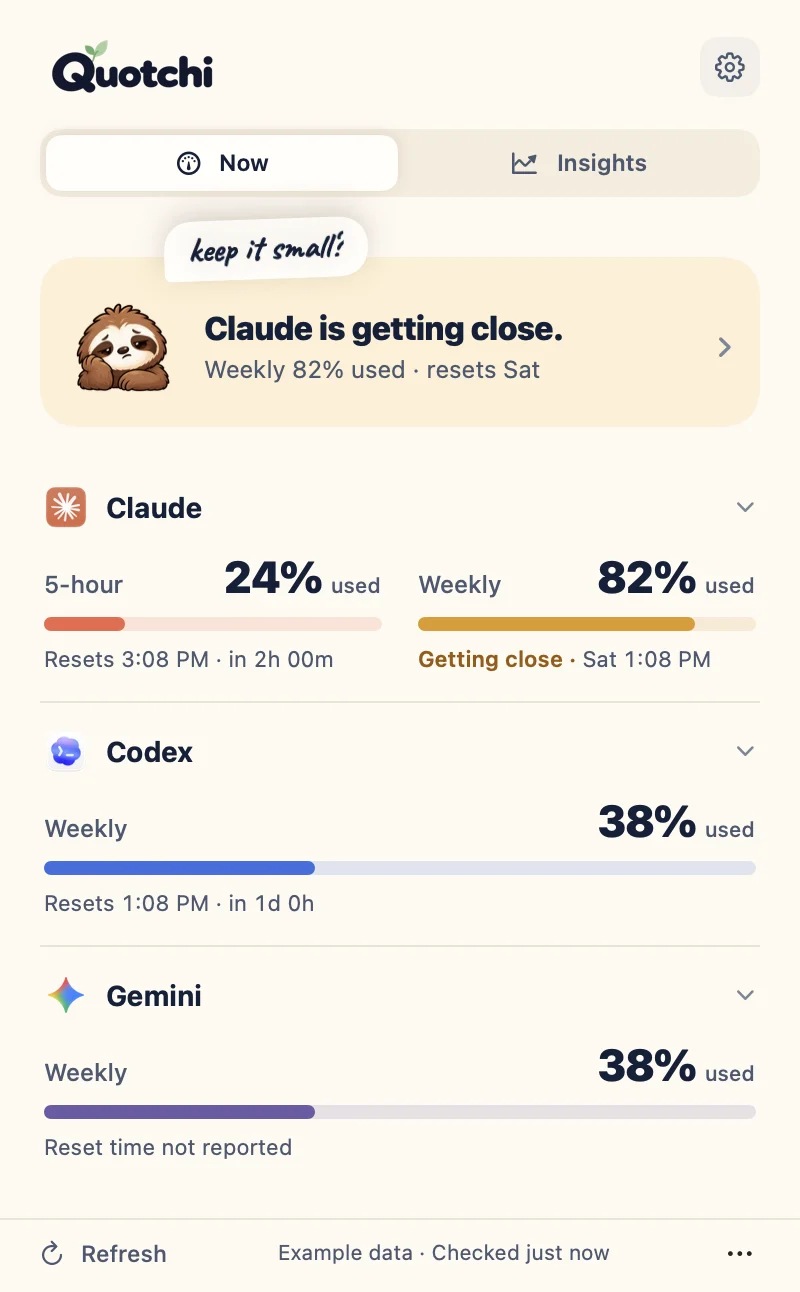
5-hour24%
Resets 1:30 PM in 2h 05m
Weekly32%
Resets 2:45 PM in 3h 20m
 Codex
Weekly38%
Resets Mon 9:00 AM in 3d
 Gemini
21%
For Claude Code, Codex & Gemini on Mac
See how much Claude Code and Codex you have left, when it resets and which tool still has room, right in your Mac menu bar. Gemini app usage too, if you want it.
Example
Claude Code
Resets 1:30 PM in 2h 05m
Resets 2:45 PM in 3h 20m
Codex
Resets Mon 9:00 AM in 3d
Gemini
How it feels
One sloth, three moods, right in your menu bar. One look tells you whether to start that big refactor or keep it small.
 Claude 32%
Every window is under 80%.
Start the big refactor.
Codex 82%~3:40 PM
A window passed 80%, and you can see when it would run out.
Keep the next task small, or switch tools.
Codex back Mon 12:17 PM
The menu bar shows when it’s back, not just 100%.
Switch to the tool with room. Quotchi can ping you at reset.
Pick a look: Sloth + %, Ring, Two tools or Minimal. Plus an opt-in “~3:40 PM” run-out time and small, medium and large widgets.
Why not just /usage?/usage and /status answer inside one session, for one tool, when you remember to ask. Quotchi keeps Claude Code, Codex and Gemini side by side in view, warns you before you run dry and pings you when a limit is back.
Inside the app
See each tool’s usage and when it resets. Missing limits and older readings stay labeled.
$ quotchi can-i
Claude is out until 2:30 PM. Codex has room.
$ quotchi wait claude && claude -c
waiting for Claude’s 5-hour limit… back 2:30 PM
▍
Claude 5h 42% · wk 61% · Codex 30%Quotchi Pro
For people running more than one Claude Code session: see which one is waiting on you and when you can resume, with a little sloth on your desktop to tell you.
One calm line, like “Claude 82% · keep it small”. Hover for details, tuck it into a screen-edge tab, or let it show up only when it matters. It hides when you share your screen.
History and Stats in one calm window: when you burn through a window, when it resets, and your week in one view. Saved on your Mac, only if you turn it on.
“2 sessions need you” sits right under the sloth card. See which one wants permission, which one a limit paused, and get a nudge when you can resume.
Pricing
A clear view of your limits, every day.
quotchi command
Know which session needs you, and when to resume.
Launch price $5 · then $8 after 50 licenses
New to Quotchi? Try Pro free for 7 days in the app. No card.
Start with Free today; Pro unlocks inside the same app, nothing to reinstall.
Secure checkout by Creem, the Merchant of Record. Read the license and terms.
Yours for life.
Launch pricesThe price rises $3 every 50 licenses, up to $19. Every license is the same lifetime Pro; only the price changes.
One-time prices in USD. Your price and any tax are confirmed at checkout. License & refunds · Manage license
Quotchi is built for Claude Code and Codex: usage, reset times and which tool has room. Gemini is optional: Quotchi reads usage from the Gemini Mac app, without reset times. Check supported versions and setup.
Download Quotchi for your Apple silicon Mac (M1 or later) running macOS 14 or later, open it and choose your tools. If a tool needs setup, the welcome screen fixes it right there, like signing in to Claude Code. Intel Macs aren’t supported. Installation guide.
No. Pay once for a lifetime license on two Macs, with all future Pro updates included. License details.
We email you a license key. Open Quotchi → Settings → Pro & updates → Enter license key, paste it and click Activate. It works on 2 Macs; to move Pro, remove it from the old Mac in the same place. Lost your key, or a Mac you can’t open? Manage your license with your purchase email.
No. Quotchi never reads what you send your tools: no prompts, no transcripts. There’s no Quotchi account; it uses the sign-in your tools already have. Optional history and Stats stay on your Mac. How Quotchi handles data.
Yes. Email [email protected] within seven days of purchase. Refund details.
The built-in setup check tells you exactly what’s missing (not installed, not signed in, or an unsupported version) with one command you can copy to fix it. Quotchi never asks for your password or API key.
A calmer view of your limits and a little more room for your ideas. Start Free. Go Pro whenever you like.
Free · ~15 MB · macOS 14+ · Apple silicon